

TabellenFaktura for Word · Manual
Activate your Word licence
The Word application requires its own Word entitlement. Activate the supplied code on the computer used for invoicing.
1. Check the Word entitlement
The Word application requires a separate Word entitlement. A standard Excel licence does not automatically activate Word. The product entitlement associated with the code is what matters, even if a personally supplied code is already familiar.
Use the complete Word activation code from its licence documents without extra spaces or line breaks. Do not store personal codes in invoice templates, invoices or public screenshots.
2. Activate in Word
- Open Word and its E-Rechnung ribbon.
- Open a protected function such as ZUGFeRD-Rechnung erstellen.
- Paste the Word code into Freischaltcode in the activation dialog.
- Select Freischalten and wait for confirmation.
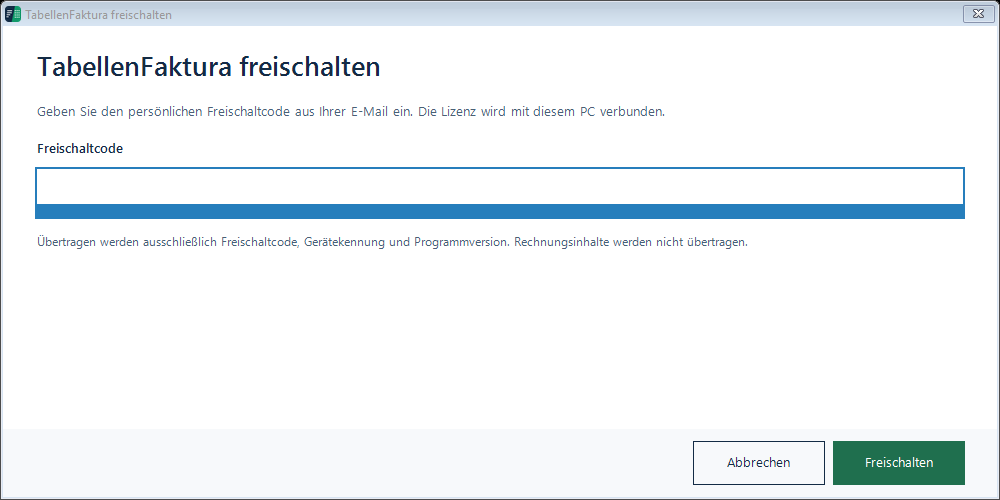
Initial activation needs internet access and binds the licence to the computer. Licence checking uses the code, device identifier and program version. Invoice contents are not needed for that check.
Trial period and temporary offline use
A supplied 30-day trial starts at the first successful activation. The confirmed licence terms govern its actual duration. Reinstalling does not restart the trial.
After a successful online check, temporary offline use is limited to at most three days and never extends the confirmed licence expiry. Initial activation cannot be completed offline. Follow any expiry or suspension message.
Move to another computer
- Create a full Word backup and separately copy the Word templates and invoice documents.
- Resolve the existing device binding through the licence's designated process or the Help Centre.
- Install the Word application on the new computer and activate its Word entitlement.
- Restore the Word backup and documents. Check numbering, customers, the archive and email settings.
A backup does not grant activation or recreate Outlook accounts. Resolve an existing device binding rather than repeatedly trying different codes.