TabellenFaktura in use

Create ZUGFeRD invoice and XRechnung directly from Excel

TabellenFaktura adds a guided workflow to Microsoft Excel: an existing invoice template is mapped, validated and exported locally as a ZUGFeRD invoice according to version 2.5.2 (PDF/A-3) or as XRechnung XML.

Download für Windows · 1.6.17SHA-256 checksum

Current version 1.6.17Digitally signedWindows 10 and 11Excel from 2016One PC per license
Overview

All functions in a clear workflow

The application leads from the one-time preparation of a template to the verification of the finished file and the prepared e-mail draft. Invoice content remains local on the Windows PC.

01

Start with a model calculation

The bill remains a normal Excel workbook. The new menu book provides creation, testing, template preparation and email functions. The example contains only freely invented data.

  • Keep existing Excel template
  • Maintain positions, amounts and customer data directly in Excel
  • No transfer of invoice contents to a web service
TabellenFaktura Model calculation with the new e-invoice menu band in Microsoft Excel
Model calculation and TabellenFaktura menu tape in Excel
02

Preparing your own template once

The preparation wizard connects invoice fields to the appropriate Excel cells and checks the minimum details. Description columns can be combined and item references secured against structural changes. Settings can be stored centrally on the PC or only in the respective workbook.

  • Assigning fields of invoice, sender and recipient
  • Set position columns and required units
  • Combine multiple description columns in a defined order
  • Secure item and column references for layout changes
  • Automatically insert e-invoices codes
  • Check IBAN and seller's bank details for completeness
  • Check the e-mail address of the buyer for a valid spelling
  • Check VAT-ID for a plausible country-specific format
TabellenFaktura Wizard for preparing a Excel template in four steps
Prepare template, assign fields and activate units
03

Checking accounting data intelligibly

The wizard takes assigned values from Excel and divides them into clearly named areas. The preliminary check shows intelligibly which data is still missing or whether everything is complete.

  • Control general data, stakeholders, positions and sums
  • Create ZUGFeRD or XRechnung
  • Trace instructions directly to the affected body
TabellenFaktura Assistant with full pre-check before creating an e-invoice
Preliminary examination with understandable summary
04

Control PDF and structured data together

After creation TabellenFaktura displays the PDF preview and embedded ZUGFeRD data side by side. Check and select location remain visible at all times.

  • Technically check PDF/A-3 and embedded XML
  • Open PDF externally or save XML separately
  • Accept finished invoice directly for e-mail delivery
TabellenFaktura Result view with audited PDF preview and embedded ZUGFeRD data
Tested result with PDF preview and XML data
05

Check the email draft before sending

TabellenFaktura prepares recipient, subject, message, signature and invoice attachment as Outlook draft. The email is not sent automatically and can be checked or changed completely.

  • Automatically attach PDF or XRechnung
  • Subject, Message and Signature Templates
  • Shipping only after manual confirmation in Outlook
Outlook E-mail draft with TabellenFaktura model invoice, recipient, message and PDF attachment
Fully prepared Outlook draft with PDF attachment
06

Make transfers easier with a payment QR code

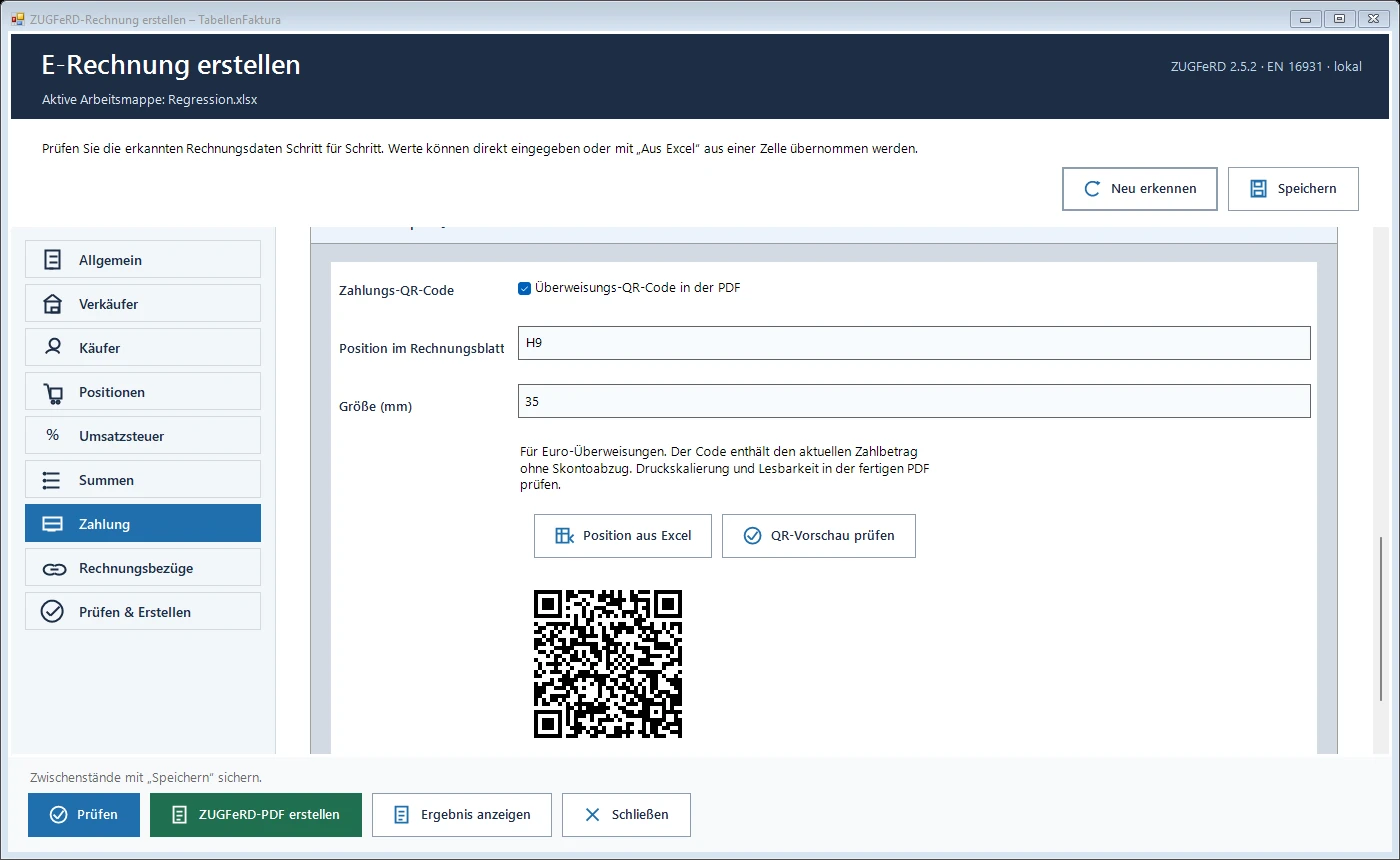
Recipients scan the optional EPC payment QR from the ZUGFeRD PDF using a compatible banking app. The account holder, IBAN, current amount due and payment reference are filled in. Set the position and size on the invoice sheet and check the code before exporting.

Set up a payment QR code
Payment section in TabellenFaktura 1.6.17 with QR position, size and payment QR preview
Position the optional payment QR and check it before creating the PDF.
Technology and safety

What TabellenFaktura does in the background

Local processing

Excel file, PDF and XML remain on the PC. The server only receives license status and installed version number.

XRechnung 3.0.2

For authorities and other recipients, a pure XML invoice including Leitweg-ID can be generated.

Mandatory updates

New test rules are automatically detected. If an update is required, an outdated version cannot be reused.

Licence binding

Each license is activated for exactly one PC. A device change can be solved in the backend.

Digitally signed

The personal download contains a signed installation file. Windows can check the Agentur Zentral GmbH as editor and the unchangedness of the file. The signature is trustworthyly time stamped.

Your next invoice can do more.

Your Excel template.
Your start in e-invoicing.

Give it a try. 30 days with your own template.

Start your free trialNo payment details. No automatic subscription.
30days free

Continue if you choose
€49.95 excl. VAT / year€59.44 incl. 19% VATAll updates included