

TabellenFaktura for Excel · Manual
Order and unlock
The personal activation code connects the license to a PC. The license is ordered before downloading and then activated in Excel.
1. Start your free trial and receive your licence code
- On the trial page enter your first name, last name and email address. Business details are optional.
- Accept the trial terms and request your free trial.
- Open the link in the email and confirm your email address.
- Your licence is displayed automatically and sent by email. The download is enabled in your verified browser session.
The 30 days begin with your first successful activation in Excel. Requesting the code again or reinstalling does not restart the trial. Five days before expiry, we send a reminder with a personal link to your prefilled billing details. Continued use costs €49.95 per year excluding VAT. Without a paid renewal, the trial ends automatically.
Den persönlichen Freischaltcode sicher aufbewahren. Er ermöglicht den Licensed download und die Freischaltung in Excel. Den vollständigen Code kopieren. Er gehört nicht in Rechnungen oder öffentliche Screenshots.
2. Unlock in Excel
- Start Excel after installation and the tab e-invoice and the
- At the latest when a protected billing function is first called up, it appears Unlock TabellenFaktura.
- The personal code in activation code insert.
- Activate select and wait for the feedback.
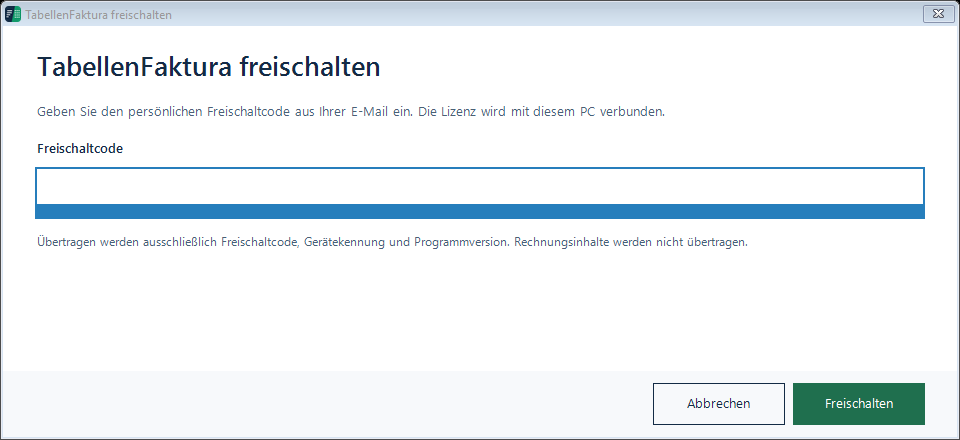
For activation and testing activation code, device identifier and program version are transferred. Invoice contents are not transferred.
License check and temporarily offline
License status and program version are checked at launch. After successful online verification, an offline period of up to three days is provided for a temporarily missing connection. It is not possible to activate the program for the first time without the Internet. If a blocked or expired license is not available, please note the notification and contact the support.
Switch or reinstall PC
A license is bound to a PC. Before moving, completely back up the billing data and copy the Excel files separately. Let the existing device binding be solved before the new PC is activated via the support. A backup transfers billing data but does not replace license sharing.
"Already enabled on another PC, do not change the code repeatedly or request a new one: The device binding has to be clarified. A new installation alone does not stop it.