

Regular invoices often copy the same address from an old Excel file. It quickly migrates with outdated addresses, foreign order numbers or the email of a contact person. TabellenFaktura offers a customer management from which the intended buyer data can be transferred into the active invoice.
For a new invoice, "Insert, use and then check the described buyer cells. The prerequisite is a suitable field assignment in the Excel template; the function does not specify which cell is intended for which address.
Prepare the buyer fields in the template
Before the first customer insertion, set up the invoice template. Name, street, postcode, location, country and the required further information must be assigned to the corresponding cells. Keep different information in separate fields as far as possible. A completely inserted address block is not a suitable basis for the targeted entry of individual buyer values.
In case of protected worksheets, the required input cells must be descriptable. If the insertion fails on a locked field, adjust the template within the scope of your own permission. A copy without protection check is not a permanent solution for a regularly used procedure. Field assignment The basis is also here.
Create a customer completely and unambiguously
- e-invoice → Customers → Manage customers and the
- New customer select and use a unique name.
- Name, street, postcode, place and country.
- Enter the e-mail intended for invoices and, if necessary, supplement VAT ID number, buyer reference and payment destination.
- Save and check a possible duvet note.
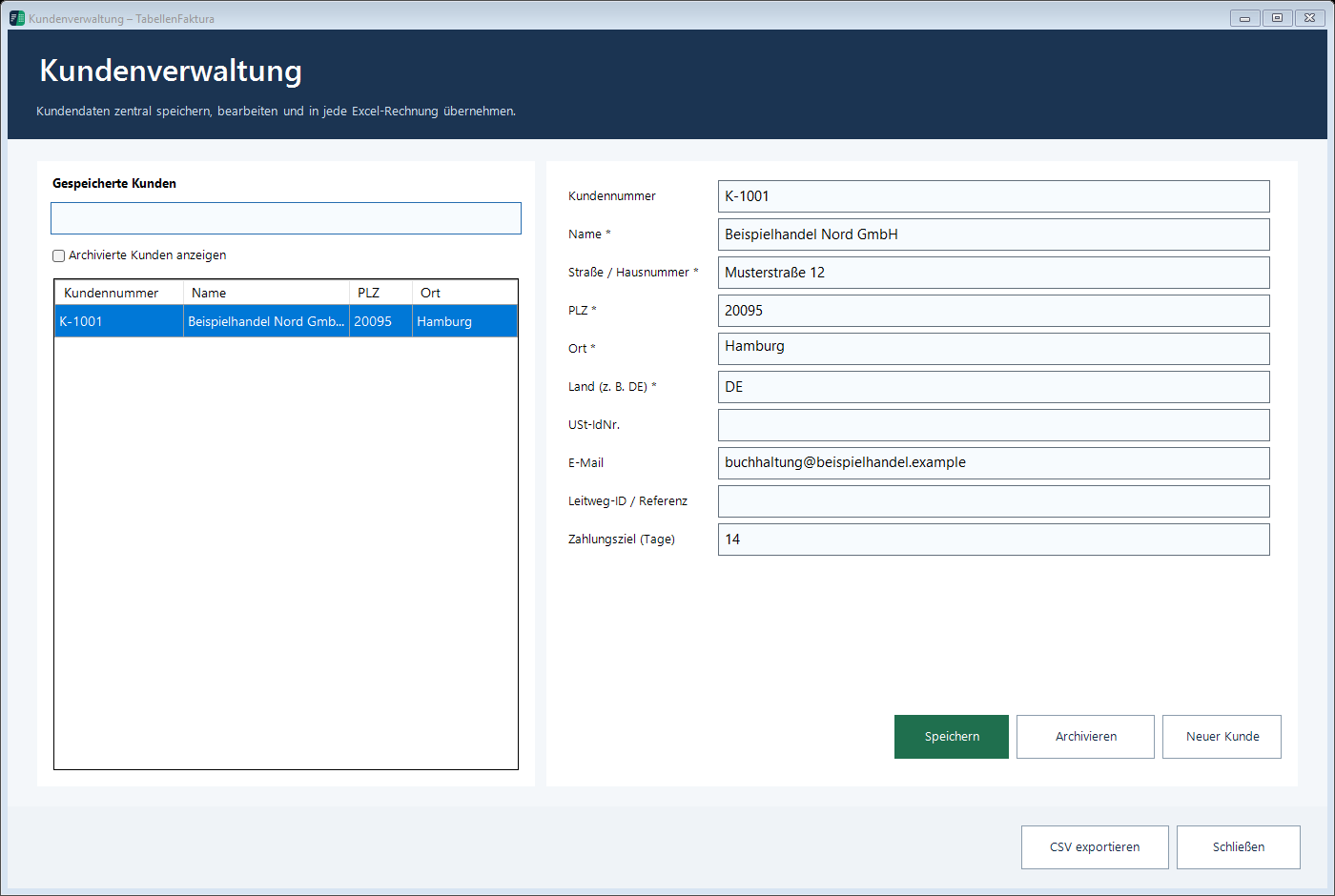
A fictitious customer "Example retail Nord GmbH, may have a general contact address and another billing address. For the billing shipment is about buchhaltung@beispielhandel.example The address in the example is not a real shipping address. In the actual customer base use the invoice address named by the recipient.
A uniform company name facilitates recognition. "Example trading Nord, "Example trading N., and "Mr. Müller, can otherwise give three data sets for the same invoice recipient. A duvet note is an opportunity to look after, not for the fast creation of another variant.
Insert customer data into a new Excel invoice
Open a new copy of the prepared invoice and activate the right sheet. Add Customer Select the desired customer. Then check the filled Excel cells: Is the company right? Is the road complete? Was the invoice email written in the correct field?
| Detail | Typical source | Check before each invoice |
|---|---|---|
| Name and address of invoice | Customer base | Current Contractor and Address |
| Invoice e-mail | Customer base | The following shall be added to the list of the goods referred to in Article 2 of this Regulation: |
| VAT-IdNo. / Buyer reference | Maintained customer data | Suitable for the concrete process |
| Order No | Current job | Do not take unchecked from the last invoice |
| Performance period | Current performance | Month or actual period |
A payment destination maintained in the customer base can be used for the calculation of the due date if appropriate. In particular, a valid invoice date and the intended maturity cell are required. The result remains to be checked, especially if the concrete order has different payment terms.
Accept existing buyer data from an invoice
For a customer already registered in Excel, Take it from account Before saving, check whether the invoice address is actually the current one. An old invoice may deliberately contain a historical address that should no longer apply in the new customer base.
The acceptance is particularly helpful in the step-by-step structure of the list. It does not replace a check on dublettes and no comparison of the invoice addressee. A project contact is not automatically the contractual partner, and a delivery address is not always the invoice address. In case of deviations use the information confirmed by the client.
Treat changes and archived customers correctly
If the address or invoice email changes, the existing data set will be maintained. For a new invoice, insert the current customer again. PDF or XML invoices that have already been generated will not be changed retrospectively by the master data change. Your original information will remain part of the respective document.
No longer needed customers can be archived. Show Archived Customers This keeps the current selection clear without rewriting historical invoice files. A customer archiving is not a cancellation of invoices and no confirmation that all claims are settled.
Control, securing and the next step
After the customer has added the other invoice details and in the assistant the area Buyer a correct Excel address and a different direct input in the wizard must not remain side by side. The finished ZUGFeRD invoice is therefore checked in both the PDF and the structured information.
The customer list can be issued as CSV. Such a list is helpful for further processing, but does not replace complete data backup with journal, settings and billing files. Customer Management Documentation explains care and security. For the subsequent export leads Creating ZUGFeRD invoices with Excel by the invoicing process.
Described function state: TabellenFaktura 1.6.8. Illustrations contain example information; recordings of previous program states are marked.
Frequently asked questions
Does customer insert the data directly in Excel?
The function takes over stored buyer data in the cells of the active invoice assigned for this purpose. Assignment, sheet and write protection must fit.
Which e-mail belongs in the customer base?
The address for the recipient for invoices. It may differ from the general contact address or the address of the project contact person.
Does a new customer address change the invoices already issued?
No. A change in the customer base does not change an already generated invoice file. New invoices must be created with the current customer data.
Can an existing Excel customer be taken over?
Yes, "Take over from invoice, the buyer's details can be used as a starting point. Check up time, completeness and possible dublettes before saving.
Does a CSV export replace the backup?
No. Customer export does not automatically contain the billing journal, all settings and final billing files.