

An invoice can be correct and, when paying, still trigger queries: The IBAN is missing, the due date comes from the previous month's copy or the purpose of the invoice is called another invoice. TabellenFaktura takes over payment details from matching Excel fields. A clean setup makes this information in PDF and structured data comprehensible.
The due date is one of the general billing data. Account holders, IBAN, BIC and payment reference are recorded under "Payment. A visible text in the Excel print foot is not taken as a corresponding data field alone.
Example: An invoice with 14 days of payment
A fictitious invoice is issued on November 12. For this example, 14 calendar days are agreed from the date of invoice, so that the due date is entered as the 26. November 2026. For 500,00 Euro net and assumed 19 percent VAT the invoice is 595,00 Euro. There is no advance payment and no discount.
The date invoice describes only this agreed starting position. Other contracts may, for example, use the invoice receipt or a specific date as reference. A standard text "14 days net, therefore, cannot be translated into any date formula without verification. The actual agreed payment condition is decisive.
| Detail | Example | Area |
|---|---|---|
| Invoice date | 12.11.2026 | General |
| due date | 26.11.2026 | General |
| Payment reference | RE-2026-0142 | Payment |
| Account holders and IBAN | Actual released bank account | Payment |
| Open amount | 595,00 € | Totals calculated |
Read the due date from a suitable Excel cell
The maturity cell should provide a real date. If the agreed calculation is 14 days from the invoice date and the invoice date is in B5, the calculation can be =B5+14 The result cell is formatted as a date and check whether B5 actually contains the current invoice date.
In the wizard, General on maturity date Select from Excel Select the cell with the calculated date, not the descriptive text next to it. After a new monthly copy, check the result again. Otherwise, an old fixed value can be retained despite new invoice.
A payment destination maintained in the customer's trunk can fill the maturity cell when inserting the customer when the customer is assigned. Even then, the comparison with the concrete agreement remains necessary. Customer management for Excel invoices explains this process.
Assign bank details and payment reference
- In the accounting assistant the area Payment and the
- Take account holders and IBAN from the intended Excel cells.
- A required BIC to complement it appropriately.
- The payment reference shall be linked to the intended use for this invoice.
- Compare the information provided with the visible invoice text.
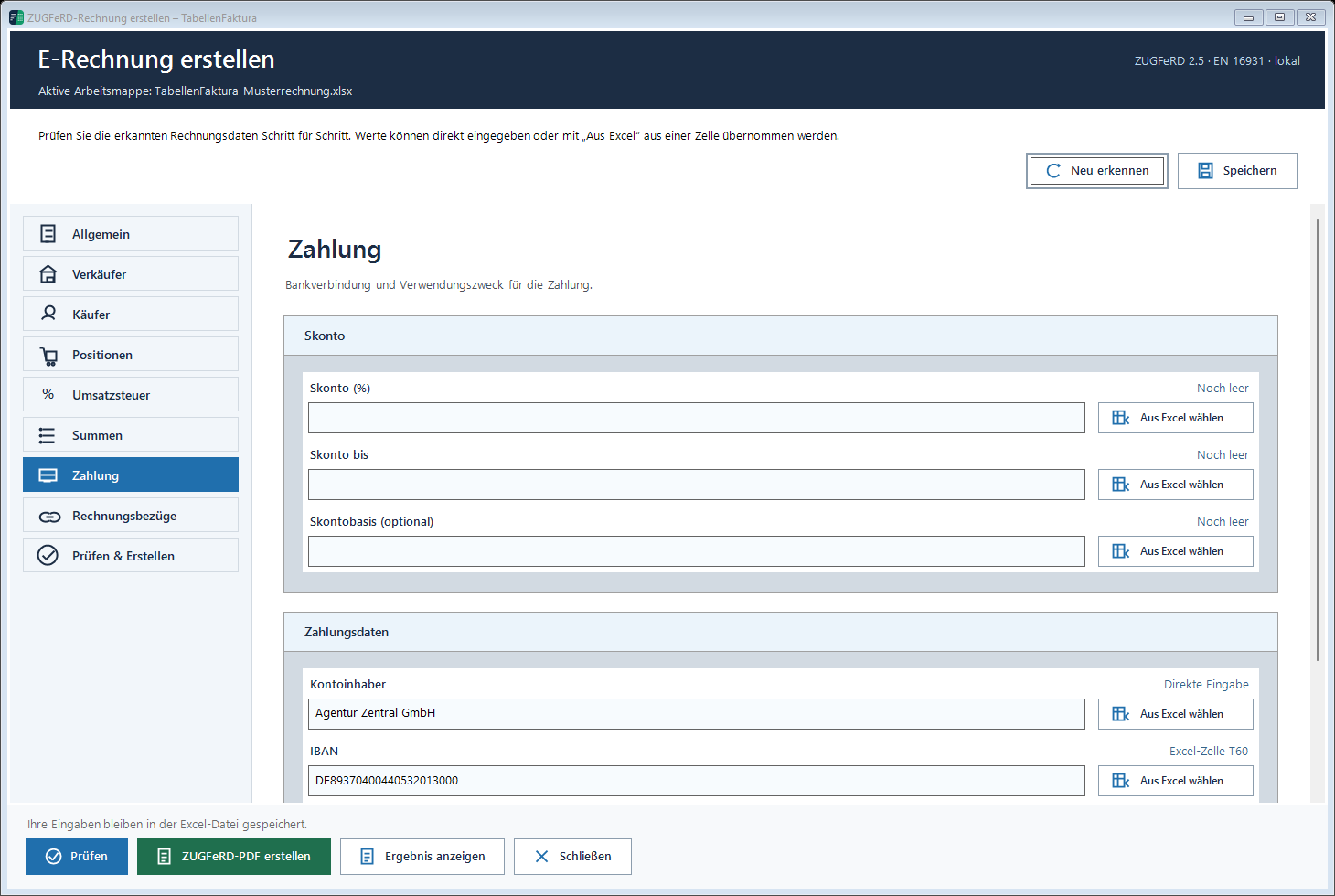
The sample image shows the control panels and sample values. For real invoices use only the confirmed bank account. A formally valid IBAN does not yet confirm that it belongs to the intended company. The assignment to the actual account account account is a separate professional control step.
The invoice number can be used as a payment reference if this is appropriate to the intended payment process. To this end, the current number cell is assigned. An order number, buyer reference or Leitweg-ID is another indication. Such references are not moved to the payment field solely because of similar names.
Keep printed information and structured fields synchronous
If account holders and IBAN are in the Excel print foot, they become visible in the PDF. TabellenFaktura nevertheless, they need to be assigned values. A direct input in the wizard is possible, but does not change the print foot automatically. Therefore, when changing a bank, all the displays used must be checked.
A comprehensible template will provide the same data source as possible for the visible indication and structured adoption. Where this is not possible due to an existing design, the comparison is included in the checklist. Logos and letterheads in ZUGFeRD invoices shows this separation.
Distinguishing discount, advance payment and maturity
A discount offer is not a payment already received. For this purpose, in the payment area own fields are provided for percentage, deadline and, if necessary, a special basis. A real advance payment is provided under Totals It reduces the open amount, not the price of each performance position afterwards.
The example invoice does not contain either. Therefore no discount values or paid amounts are entered. Do not take over a known standard text from an old template unchanged if the concrete order has other conditions. The detailed calculation example is in the article Discount and discount in the e-invoice.
Check the completed invoice and the shipping text together
After the preliminary check, compare the invoice. In the results view, compare maturity, bank details, reference and open amount with the PDF. Then also read the email draft: If the message text contains a fixed old date, it can contradict the correct invoice. For recurring texts, suitable accountants are useful.
The Documentation area of payment Names the fields. The completion with PDF and embedded data explains Creating ZUGFeRD invoices with ExcelThe objective is to provide an invoice from which recipients can clearly enter the amount, maturity and payment method.
Described function state: TabellenFaktura 1.6.8. Illustrations contain example information; recordings of previous program states are marked.
Frequently asked questions
Where is the due date recorded in TabellenFaktura?
In the general area, bank details and payment reference are, however, subject to payment.
IBAN in the Excel print foot?
For the structured acquisition not alone. The IBAN additionally assigns via a matching field or capture in the wizard and compare with the PDF.
Can the invoice number be used as a purpose?
Yes, if this is the correct payment procedure. Use the current invoice number as a payment reference and do not accidentally take over an old number.
Does a valid IBAN confirm the correct payee?
A formal audit does not confirm the allocation of the account to the intended company. The actual bank account must be unique.
Does a discount offer immediately reduce the open invoice amount?
A discount offer is not yet a receipt of payment. Discount terms and amounts actually paid are recorded separately.