

Many self-employed and small businesses write invoices in Excel. An existing template can still form the basis if their table fields are reliably transferred to structured invoice data. Thus, a ZUGFeRD invoice or XRechnung can be created from Excel without rebuilding the familiar invoice image.
For the hybrid PDF format, the guide shows Creating ZUGFeRD invoices with Excel the complete process with field assignment, calculation example and testing of PDF and XML.
Excel alone does not create a standards-compliant e-invoice. A suitable extension maps invoice fields and line items, creates structured XML data from them and validates the result. The output is either a ZUGFeRD invoice according to version 2.5.2 (PDF/A-3 with embedded XML) or a pure XRechnung XML.
Can Excel create a ZUGFeRD invoice or XRechnung?
The workbook provides values, calculations and the visible invoice image. For an e-invoice, these contents must be additionally assigned to the data model of EN 16931, provided with standardized codes and technically validated. This step requires a suitable software or a controlled conversion process.
Why saving as PDF is not enough
Excel can output an invoice as PDF. This PDF shows people the content but it does not contain fully structured billing data according to EN 16931. A e-invoice must machine-readable provide fields such as invoice number, parties, positions, tax breakdown and payment information.
The solution is not to abandon the table. Instead, relevant cells are assigned to the professional accounting fields once. From this data, a ZUGFeRD invoice or XRechnung can be generated.
Step 1: Prepare the Excel template
The information is determined first. Typical assignments are invoice number, invoice date, seller, recipient, date of payment, currency, payment destination and bank account. For items, the row range and columns for denomination, quantity, unit, price and tax are defined.
Good assignments are reusable. They are stored with the workbook and are ready for the next invoice. Changes to rows or columns should then be made consciously and re-examined.
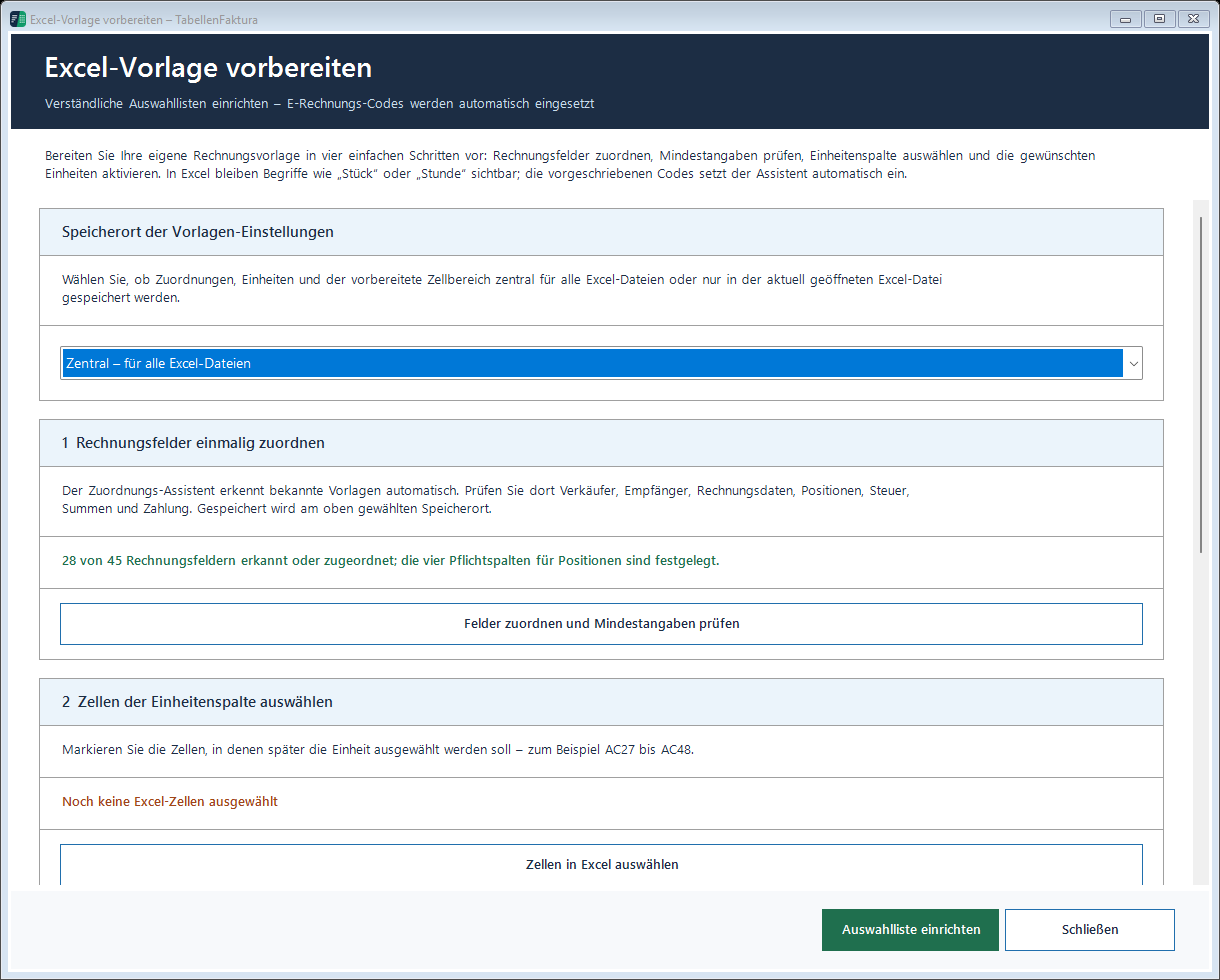
All operating steps are located in the Excel template documentation.
Step 2: Translate comprehensible input into structured data
e-invoices work with standardized codes. A unit such as "piece, is technically different from "hour, or "meter,. Users should still be able to work with understandable terms. The software only translates these values into the intended code when output.
Tax categories are equally important. A tax rate of zero per cent alone is not sufficient. It must be clear whether there is a tax exemption, reverse charge, intra-Community delivery, export or any other matter. The professional selection remains the responsibility of the invoice issuer.
Step 3: complete missing information
An existing Excel invoice does not always contain all structured mandatory fields. A managed assistant can query missing information and explain directly what it is needed for. In case of an XRechnung to an authority, buyer reference, electronic address and contact details are often added.
Helpful error messages do not only call a technical rule code. They lead to the affected indication or position line. This shortens the correction especially for longer invoices.
Step 4: Create the right result
For a ZUGFeRD invoice, the visible invoice sheet is output as PDF. Then, the structured XML data is embedded. The result is a PDF/A3 hybrid invoice. For XRechnung, a standalone XML file is created.
Both results should be validated against the appropriate technical rules. For XRechnung, the official KoSIT verification configuration and the version valid at the time of the exhibition are crucial. For ZUGFeRD, profile, XML and PDF/A properties must match.
Step 5: Test human and technical
A technical examination finds missing mandatory fields, inadmissible codes and computer contradictions. However, it cannot assess whether the service has actually been provided or whether the tax case has been correctly selected. Therefore, visible invoice image and structured data should be checked together before dispatch.
Step 6: Prepare for shipment
After the check, TabellenFaktura can prepare a Outlook draft with recipient, subject, message, signature and invoicing attachment. The email remains a draft until personal control and will not be sent automatically.
Typical errors from practice
- A simple PDF is mistakenly considered as e-invoice.
- Mandatory information is only in the visible image and is missing in the XML.
- Free unit abbreviations cannot be clearly assigned.
- Net, tax and gross are different from the wrong rounding.
- Tax-free items do not have a suitable category or justification.
- Authorities are missing Leitweg-ID or electronic address.
- The XML is not created against current rules.
Local processing as a conscious decision
Invoices contain sensitive customer, tax and bank data. A local solution processes this content directly on the Windows PC. For the creation and validation no transmission of the invoice to an online service is necessary. The license server only needs to know if the activation code is valid and which program version has been installed.
An existing Excel template can remain part of a clean e-invoice process. The key is reliable field assignment, complete structured data, current test steps and conscious technical approval.
The hybrid format is shown in the article Create ZUGFeRD invoice: build, example and check The contribution ZUGFeRD or XRechnung supports with the format selection.
The overview helps with concrete test problems ZUGFeRD calculation invalid: seven typical Excel errors and their solution. A special accounting case explains the Excel Example of deduction and final invoice as e-invoice.
Frequently asked questions
Can Excel create a XRechnung itself?
Excel provides the billing data. For a normal XRechnung, this data must be transferred to a permissible XML structure and technically checked. This requires an appropriate extension or external process.
Does an existing Excel template have to be rebuilt?
Not mandatory. In TabellenFaktura fields and position columns can be assigned to an existing template once and saved in the workbook.
Are bills uploaded?
No. TabellenFaktura creates and checks invoices locally. No invoice contents are transferred during the license reconciliation.
Can ZUGFeRD and XRechnung be created from the same template?
Yes. Common accounting data can be used for both output channels. Additional information may be required for XRechnung depending on the recipient.