


Discount and discount may not disappear in the same deduction field in an e-invoice. An already agreed discount reduces the charged price. Discount is a condition attached to the payment. The following example of Excel separates both cases and leads from the position amounts up to the possible discount amount.
Position discount is part of the affected line, invoice discount at the receipt level and a discount that has not yet been realized in the payment terms. A possible discount discount may not shorten the regular invoice amount a second time when it is created.
Differentiating position discount, invoice discount and discount
| Case | Effect in the example | Structured classification |
|---|---|---|
| 10 % Discount on position A | 500,00 € become 450,00 € net | Discount of the individual position |
| 5 % Discount on both positions | 850,00 € become 807,50 € net | Document-level discount |
| 2 % Discount on timely payment | Possible subsequent deduction of 19,22 € | Payment terms |
This order follows the calculation basis expressly agreed here. A discount can only apply to certain articles. Therefore, fields such as "Discount: 5 %, without a recognizable basis are not sufficient. Already in Excel it should be determined which amounts a discount includes and whether a price already contains the discount.
Example: 960,93 Euro invoice amount, 941,71 Euro with discount
The fictitious invoice contains two positions, each with 19 percent VAT. Position A receives 10 percent position discount. After that, 5 percent invoice discount is granted on the total remaining position sum. Without advance payment, the gross amount is fully open.
| Step | Calculation | Result |
|---|---|---|
| Position A before discount | 10 × 50,00 € | 500,00 € |
| Position discount A | 500,00 € × 10 % | −50,00 € |
| Item A net | 500,00 € − 50,00 € | 450,00 € |
| Item B net | 5 × 80,00 € | 400,00 € |
| Total items | 450,00 € + 400,00 € | 850,00 € |
| Invoice discount | 850,00 € × 5 % | −42,50 € |
| Tax base | 850,00 € − 42,50 € | 807,50 € |
| VAT | 807,50 € × 19 %, rounded | 153,43 € |
| Amount of invoice | 807,50 € + 153,43 € | 960,93 € |
| Possible discount deduction | 960,93 € × 2 %, rounded | 19,22 € |
| Payment with discount | 960,93 € − 19,22 € | 941,71 € |
The discount deduction of 19,22 Euro is subject to one condition: timely payment on the agreed basis. In the example, it is not a further invoice discount of 19,22 Euro net. Without fulfilling the condition remain to pay 960,93 Euro.
Excel formulae with a unique calculation basis
A possible table uses B for quantity, C for net price, D for position discount as percentage and E for the discounted position amount. In row 12 are 10, 50,00 and 10 %. Line 13 contains 5, 80,00 and 0 %.
- Position A, E12:
=RUNDEN(B12*C12*(1-D12);2)→ 450,00 Euro - Position B, E13: the same formula for line 13 → 400,00 Euro
- Position sum, E16:
=SUMME(E12:E13)→ 850,00 Euro - Invoice discount, E17:
=RUNDEN(E16*5%;2)→ 42,50 Euro - Tax base, E18:
=E16-E17→ 807,50 Euro - VAT, E19:
=RUNDEN(E18*19%;2)→ 153,43 Euro - Gross, E20:
=E18+E19→ 960,93 Euro - Possible payment with discount:
=E20-RUNDEN(E20*2%;2)→ 941,71 Euro
In D12, the difference between 10% and the mere number 10 The formula expects a percentage of 0,10. A discounted single price may not be reduced again with the same discount. A template should either use the original price including discount or the already reduced price and maintain this representation throughout.
What amounts belong in ZUGFeRD?
The e-invoice must be a comprehensible representation of the computational logic. In this example, the net line amounts are 450,00 and 400,00 Euro. The additional document discount is 42,50 Euro and belongs to the tax group with 19 percent. As a reason for the estate, the actual agreement, such as "5 % order discount, is suitable.
| Field in the European data model | Value in the example |
|---|---|
| Total of the invoice lines, BT-106 | 850,00 € |
| Total of document reductions, BT-107 | 42,50 € |
| Total amount excluding VAT, BT-109 | 807,50 € |
| VAT amount, BT-110 | 153,43 € |
| Total amount of VAT, BT-112 | 960,93 € |
| Number of cases, BT-115 | 960,93 € before the discount is used |
| Payment conditions, BT-20 | Agreed payment period and a 2% cash discount |
The calculation relationship between line sum, document discounts and net total amount is shown in the EN-16931-Rule BR-CO-13 For several tax rates, a document discount needs a suitable distribution between the tax groups concerned. A flat-rate deduction in only one group will otherwise change the tax calculation.
Specify discount as payment condition
An understandable agreement designates discount period, percentage and, if applicable, a limited basis. Example: "2 % discount when paying within 10 days from the invoice date, otherwise payable within 30 days. Whether this agreement applies must be technically predetermined.
For XRechnung, account information in BT-20 must be transmitted according to a specified spelling. Federal Invoicing Notes explain the machine-readable syntax. For the example, a discount line reads:
#SKONTO#TAGE=10#PROZENT=2.00#
The line ends with an XML-compliant line break. If the deduction is only for one sub-assembly, the agreed BASIS CONTRACTION is added. Capitalization, points as decimal separators and the separators are technical specifications. The identical spelling is not mandatory for each ZUGFeRD profile; the specific output profile and its rules are decisive.
If discount is actually used, the subsequent reduction in charges must also be taken into account in tax terms; the basis is: § 17 UStG. An already paid partial invoice, a discount and discount are therefore three separate facts.
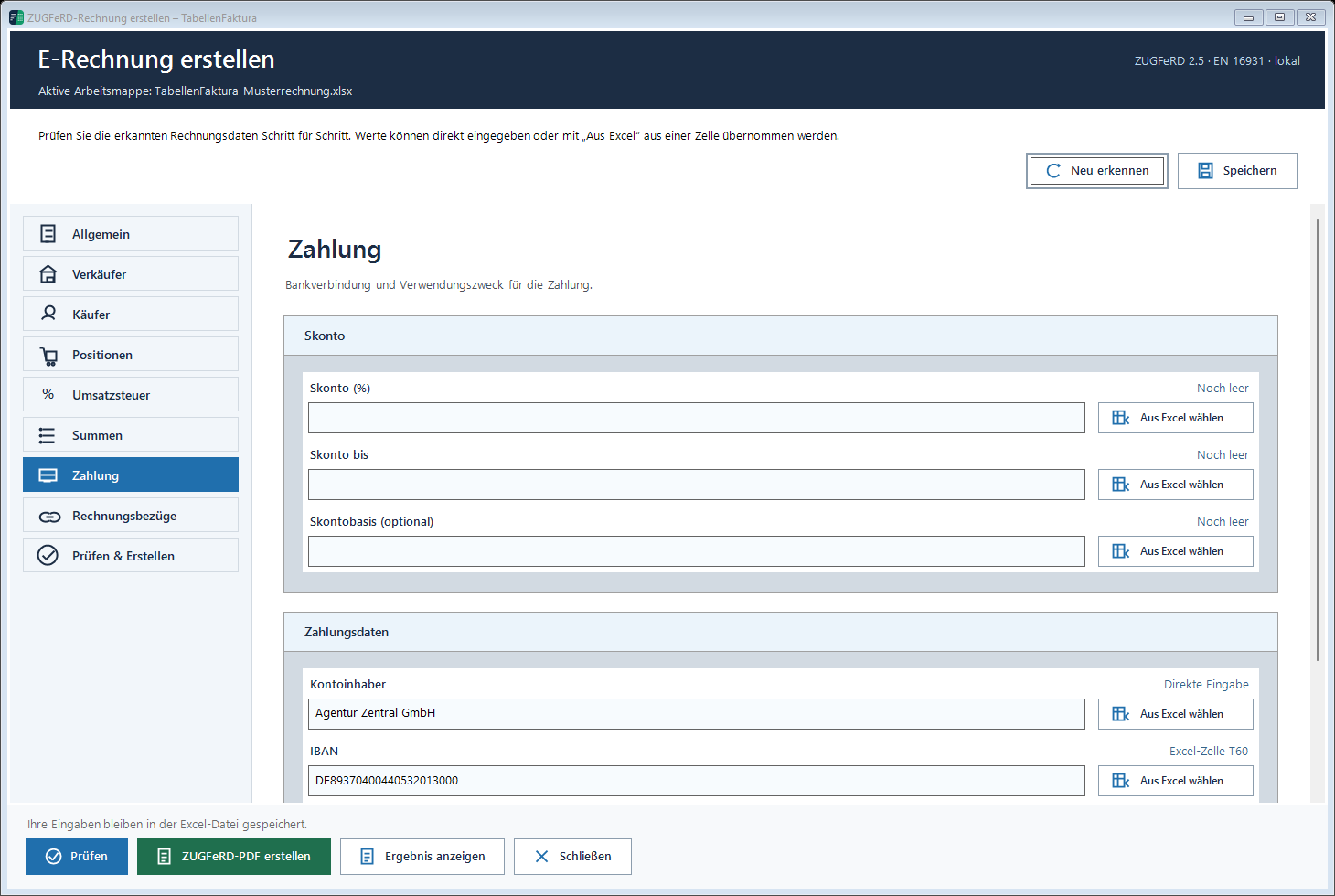
The Payment documentation shows the fields. For several control groups, the described TabellenFaktura level does not support a flat-rate document discount without a clear assignment; display and check such a case appropriately at position level.
Compare these points before exporting
- Each discount is taken into account exactly once.
- Percentage and base are comprehensible.
- Document discount and control group fit together.
- PDF and XML show the same net, tax and gross amounts.
- The possible discount amount will not be deducted as early payment.
- The terms of payment correspond to the agreement and the output profile.
The entire way from the template to the verified file Creating ZUGFeRD invoices with Excel. For deviations by one cent, the Example for the correct rounding of invoice amounts.
Frequently asked questions
Is Discount the same as an invoice discount?
No. An already granted discount reduces the invoice. An additional discount deduction belongs to the payment terms and becomes effective only upon payment.
Is discount calculated before or after the VAT?
In the net-price example shown, line-item and invoice-level discounts first reduce the net taxable amount. VAT is then calculated on that amount. The actual price agreement remains decisive.
What should be considered with several rates?
The tax groups concerned must be assigned to the documents at the level of the document. A discount on the entire invoice may not be applied to a single group in full without verification.
What amount of payment is before using the discount in the invoice?
In the example 960,93 Euro. Only if the discount condition is fulfilled, the payment is reduced by 19,22 Euro to 941,71 Euro.
Where does discount in a XRechnung stand?
Cash discount information is represented in payment terms BT-20 using the prescribed syntax. The technical notation must match the current XRechnung rules.