


Material, working hours and directions can still be calculated in Excel. For an e-invoice, this must be clearly assigned accounting data: each position requires a description, a quantity, a unit, a price and a tax classification. The following example leads to a craftsman's invoice from the table to the examination of the ZUGFeRD file.
140,00 Euro material + 442,00 Euro working time + 35,00 Euro travel results 617,00 Euro net. If 19 % VAT is assumed to be 734,23 Euro. All three items also belong in the structured invoice data.
When do craftsmen need an e-invoice?
The principal is the first to decide. For transactions between domestic companies, the B 2B rules apply, including transitional periods. Private customers do not fall under this B 2B obligation; a duty to issue invoices can nevertheless exist. Public authorities have additional requirements on format and transmission. The delimitation explains the Federal Ministry of Finance in its e-invoices-FAQ.
| Contracting entities | Clear before creation | Practical consequence |
|---|---|---|
| Private household | Desired method of accounting | Readable, complete invoice; no automatic B2B e-invoicing requirement |
| Domestic holding | Applicable deadline, format and address | ZUGFeRD can connect PDF and structured data |
| Contracting authority | Ordering specifications, Leitweg-ID, portal and format | The specific acceptance point determines the route of submission |
The address of the invoice is not necessarily a site address. On behalf of the consignee, the place of service and the contact person may differ from each other. This information should already be kept separately in the presentation. e-invoice Deadlines 2027 and 2028 deals with the introduction of time.
Example: Material, 6,5 hours of work and a journey
A fictitious business invoices installation work completed on 29 September 2026. The invoice number is HW-2026-0930 and the invoice date is 30 September 2026. This calculation example assumes an ordinary domestic service subject to 19% VAT, without a discount or advance payment.
| Item | Quantity | Unit | Net unit price | Amount net |
|---|---|---|---|---|
| Assembly material, set according to order | 5 | Pieces | 28,00 € | 140,00 € |
| Assembly and function testing | 6,5 | Hours | 68,00 € | 442,00 € |
| Arrival by agreement | 1 | Flat rate | €35.00 | €35.00 |
| Net total | 617,00 € | |||
| VAT 19 % | 117,23 € | |||
| Amount of invoice / amount of payment | 734,23 € | |||
The separation makes the invoice comprehensible: material is not in an indefinite collection position "work, hidden. The service description indicates the actual agreed activity. A supplementary hourly proof can document individual times; the billed service and its amount must remain understandable in the invoice data.
This is how the Excel table is built
In the example, the three positions in the rows 12 to 14 are the following. Column B contains the description, C the quantity, D the net price and E the position amount. The formula in E12 is =RUNDEN(C12*D12;2) and is copied to E13 and E14. =SUMME(E12:E14) The net sum of 617,00 Euro is generated.
The VAT is used for this one control group with =RUNDEN(SUMME(E12:E14)*19%;2) The net sum and tax result in the gross amount. The numerical formatting alone does not round the underlying cell value; the Instructions for rounding errors in Excel invoices explains this difference.
6 hours and 30 minutes correspond to 6,5 hours, not 6,30. A time saved as Excel clock must be converted to decimal hours before the price calculation. If a real time value is C 13 returns =C13*24 the number of hours; for a quantity already recorded as decimal, this conversion is incorrect. A uniform input standard prevents such confusion.
Units are in a separate column. For hours, the structured format usually uses HUR, for example H87 for pieces. A flat rate can be represented as an agreed power unit. The decisive factor is a semantically suitable assignment from the valid code list, not the unchecked acceptance of any abbreviations. UNECE Unit List in the Peppol Documentation contains the standardised codes.
How does it turn into a ZUGFeRD manual worker bill?
A regular PDF export from Excel does not yet contain a structured e-invoice. A suitable tool must assign the table values to technical accounting fields and create the appropriate output format. Creating ZUGFeRD invoices with Excel explains the process including PDF/A-3, XML and verification.
With TabellenFaktura the fields of account and the position range are assigned to the existing Excel template. A later table structure must be checked again: An inserted column or an additional sum line can change a previously appropriate assignment. feature overview shows the planned work process.
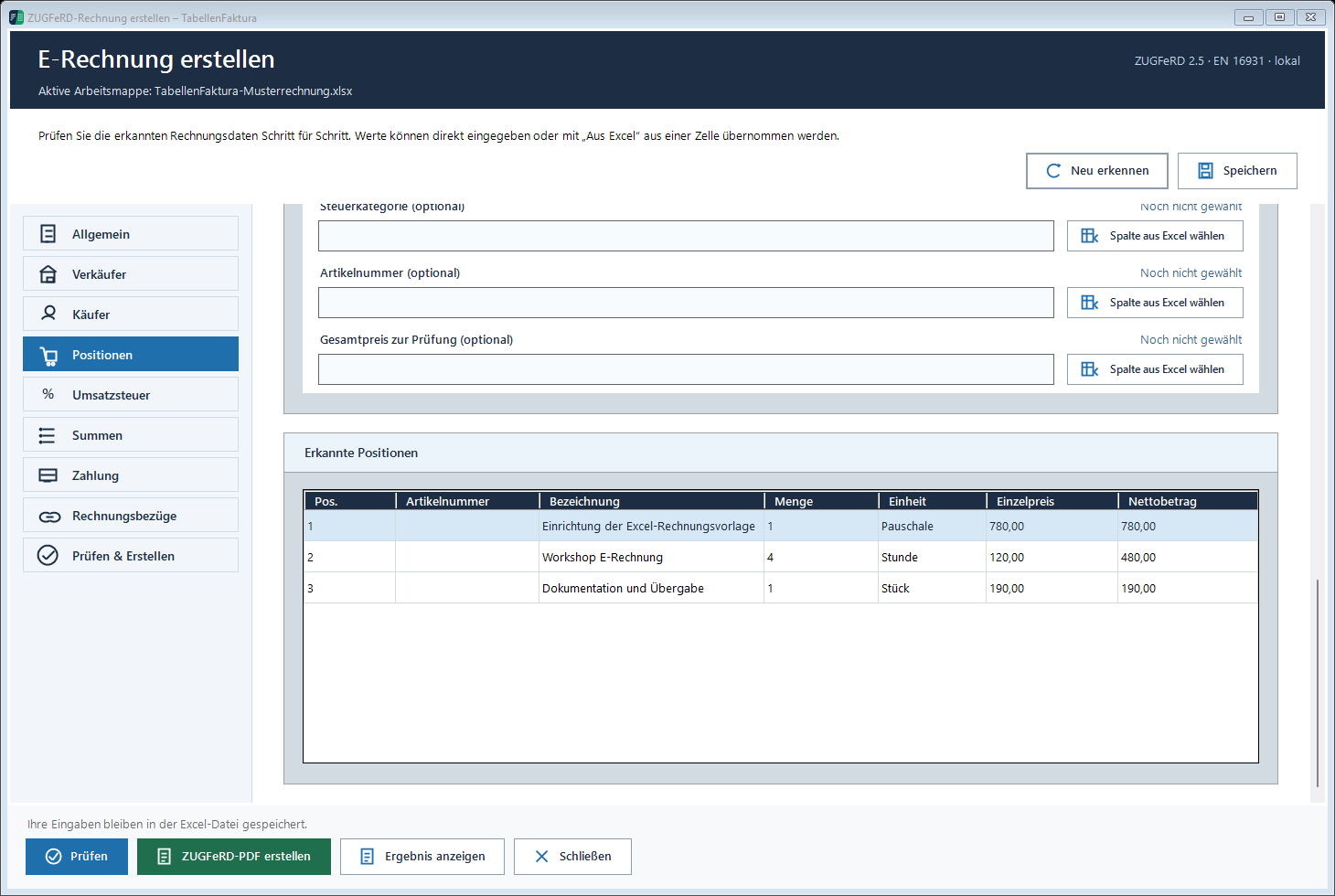
The Position assignment in TabellenFaktura describes the selection of columns and rows.
Reductions, final invoice and special tax cases
The amount of the premium is not negative. For them, the previous receipts, payments and tax amounts must be taken into account. Decrease and final invoice as e-invoice an example of its own.
The assumed 19 percent cannot be transferred to any craft work. § 13b UStG The tax is payable by the beneficiary for construction work. Then the tax category and the invoice note change. This is a professional classification before export; a passed XML test does not decide this tax question.
Checklist before shipment
- Client and place of service are properly separated.
- Number, invoice date and performance date are correct.
- The working time is recorded as the correct decimal quantity.
- Material, work and travel are published in PDF and XML.
- 617,00 Euro net, 117,23 Euro tax and 734,23 Euro brutto match in the example.
- Tax case, recipient specifications and technical verification report were checked.
- The actual file sent will be retained with the supporting documents.
If rejected, a specific error message will help you further than a new PDF export. ZUGFeRD calculation invalid: typical Excel error ordt frequently causes.
Frequently asked questions
Can a craftsman's bill be written in Excel?
Yes. Excel can provide the calculation and the invoice image. For a ZUGFeRD invoice, an additional tool is required that generates structured invoice data and embeds it correctly in PDF/A-3.
How are 6 hours and 30 minutes calculated?
For an hourly price, the rate is expected to be 6,5 decimal hours. 6,30 would be a different amount. A Excel time value must be converted into hours by multiplying it to 24.
Do you need to get into the XML data?
Cost of travel must also be taken into account in a structured manner. In the example, they are a separate invoice position with a quantity 1 and the agreed net price.
Does every private customer need an e-invoice?
The B2B e-invoicing requirement does not apply to private consumers. A separate obligation to issue an invoice may nevertheless apply.
Is a Leitweg-ID required for every craftsman bill?
No. The Leitweg-ID is particularly relevant for the assignment of contracting authorities. For normal B2B invoices there is no general Leitweg-ID obligation.