


Four hours to 120,00 Euro is a different performance than four lump sums to 120,00 Euro. Even if the amount is equal, the unit describes an important part of the calculation. TabellenFaktura combines understandable units in Excel with the appropriate codes of the structured e-invoice.
In the template preparation, mark the input cells of the unit column, select the required units and set up a selection list. Then use a matching unit in each position and apply quantity and net unit price to the same unit.
Quantity, unit and unit price form a common statement
The amount counts the units billed. The unit price is valid for one of them. For "4 hour to 120,00 Euro, the net position amount is 480,00 Euro. For a flat rate facility, "1 flat rate to 780,00 Euro, may be appropriate. The unit is determined by the agreed performance, not only by the desired invoice result.
A lot of one does not make the unit field superfluous. Also a single package or a single piece must be described as such performance. Free abbreviations are problematic if they do not match the intended designations. Therefore, use the terms offered by the program instead of inventing new spellings in each workbook.
A complete example with three units
| Description | Quantity | Unit | Net price | Net amount |
|---|---|---|---|---|
| Setting up the Excel invoice template | 1 | Flat rate | 780,00 € | 780,00 € |
| Workshop e-invoice | 4 | Hour | 120,00 € | 480,00 € |
| Documentation and handover | 1 | Pieces | €190.00 | €190.00 |
The three items are net 1.450,00 Euro. For this example, assumed 19 Percent VAT, 275,50 Euro is added; the gross amount is 1.725,50 Euro. Different units do not prevent items from having the same tax rate. Conversely, the tax treatment is not determined by the selected unit.
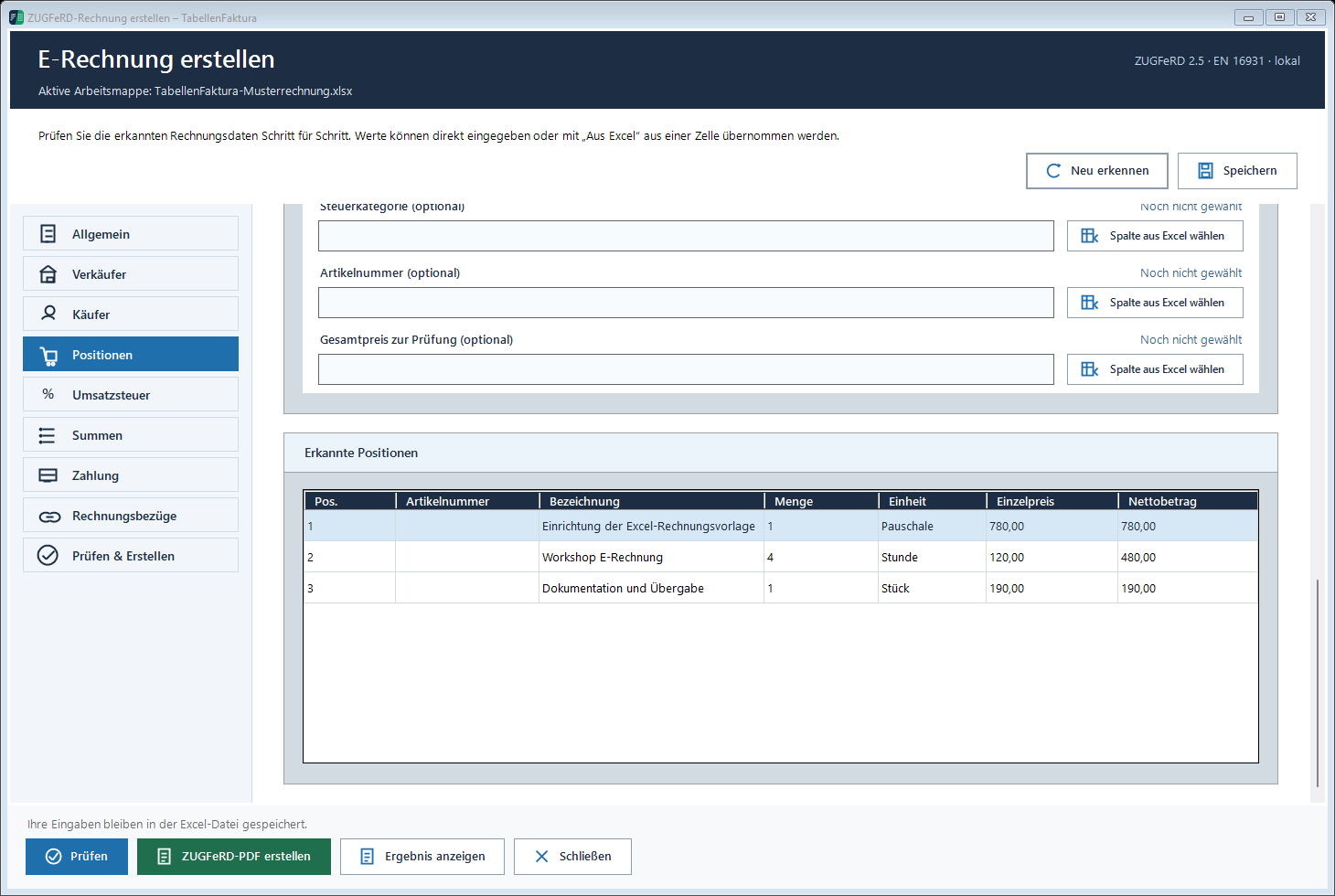
The recording shows the same three types of benefits. The list shows the name, quantity, unit, unit price and net amount side by side. This shows whether, for example, the four workshop hours were actually taken as hours and not by accident as four pieces.
Configure the combo box in the Excel template
- Open the prepared workbook and the correct bill sheet.
- e-invoice → Preparing your own Excel template → Excel template The
- Select cells in Excel open and mark only the intended units input cells.
- Activate the units required in the daily invoice, for example piece, hour, meter and flat rate.
- Configure Selection List select and save the Excel file.
For a position block in line 20 to 35, the list belongs to the corresponding unit column of this block. Headlines, sum lines or address fields should not be marked. The selection describes the input area in the template; it does not replace the allocation of the unit column in the billing wizard.
The detailed Unit instructions describes the operating path. Grow the billing lines later beyond the prepared area, check the selection list and the selected position area together.
Calculate time as quantity correctly
For hourly invoices, the quantity is particularly important. One and a half hours correspond to the decimal quantity 1,5. A Excel time value "01:30, however, is first a time or continuous representation and not automatically the number 1,5. The assigned quantity source must provide the numerical value to be calculated.
For a simple template, the decimal hour number can be entered directly into the quantity cell. If it is taken from a time recording, check the conversion in your own file. If 1,5 hours are 80,00 Euro, 120,00 Euro net is expected. An unexpectedly small amount is an occasion to examine the underlying cell value and not just the visible formatting.
Detect typical errors in units and prices
- Empty unit: A lot alone does not describe the position completely.
- Free abbreviation: A self-chosen abbreviation may differ from the supported terms. Use the selection list.
- Price for another unit: A meter price may not be combined with a unit quantity if it is actually calculated by length.
- Total price instead of unit price: For four hours, enter EUR 120.00 as the unit price, rather than the already calculated EUR 480.00.
- New line outside the list: After additions, the drop-down selection in the new cells may be missing.
A correction in the wizard is not enough if the Excel print image still shows another unit. Correct the source in the workbook and then read it again or check it again. The visible invoice and its structured positions are to describe the same performance.
Match the completed invoice with the performance data
Compare each detected position with the Excel file before creating it. In case of a uniform calculation, the net sum will also help as a countercheck. After that, perform the pre-check, create the file and pay attention to quantities and units in the result view. A technically accepted file cannot reliably recognize a technically mischosen unit price as such.
For mixed crafts, the following shall be included: Accounting for material, working time and travel costs another example. The entire ZUGFeRD run describes the instructions for creating from Excel.
Described function state: TabellenFaktura 1.6.8. Illustrations contain example information; recordings of previous program states are marked.
Frequently asked questions
Do technical unit codes have to be entered in Excel?
The prepared selection uses understandable terms. TabellenFaktura uses the appropriate e-invoicescodes for this when creating.
Does a flat rate need a unit?
Yes. A position with quantity one also requires a suitable unit, for example flat rate.
Is 01:30 automatically a lot of 1,5 hours?
No. A Excel time value and a decimal hour number are different values. The assigned amount must deliver the numerical value 1,5 for one and a half hours.
What should be considered when adding new billing lines?
Check whether both the unit selection list and the position area read by TabellenFaktura include the new lines.
Does the unit determine the VATset?
No. The unit and tax treatment are different. The tax must be determined separately for the actual performance.