


In reverse-charging, the special tax treatment is not expressed by a zero in the VAT cell alone. For e-invoice, the tax category, tax rate, justification and the required party information must match. TabellenFaktura provides the corresponding fields in the billing assistant.
For a process already clarified as reverse batch, record the corresponding tax category AE, the sentence 0 and a corresponding explanatory text. Check the buyer details including the VAT ID no required by TabellenFaktura. A general tax exemption is another classification.
The tax classification is before the programme entry
The application of reverse batch depends on the actual turnover and the parties involved. § 13b UStG The following example therefore expressly requires that the treatment for the actual order has already been clarified.
For relevant invoices, the § 14a VAT The statement ‘Tax liability of the beneficiary, shall specify the circumstances in which the benefit is paid. It shall not replace the prior classification or the other necessary accounting data.
The guide deals with the implementation in Excel and TabellenFaktura. It is not a list of all reverse-charging cases. In particular, tax-free transactions, intra-Community deliveries and a zero tax rate are not equated solely for an amount of zero euros VAT.
A calculation example without a designated VAT
The fictitious invoice contains a correspondingly classified service: 10 units to 100,00 net. There are no discounts, advance payments or surcharges. The position sum is 1.000,00 Euro. The invoice does not show any amount of VAT calculated by the exhibitor in this example; the invoice amount and the open amount are 1.000,00 Euro each.
| Detail | Value in the example | Check |
|---|---|---|
| Position sum | 1.000,00 € | 10 × 100,00 € |
| Tax category | AE / Reverse charge | Matching classification of the process |
| Rate: | 0 % | No residual value of 19 % from the template |
| VAT amount | 0,00 € | Compare with Excel and structured data |
| Open amount | 1.000,00 € | No prepayment in the example |
The unit must fit the actual performance. The neutral term "units, here serves only the invoice; in the own template, for example, use hour, piece or lump sum. Names, addresses and tax identifiers must come from the real, audited business process.
Match the Excel template to the special tax treatment
Open a copy of the prepared template. Capture the positions with net prices and check the visible tax and sum formulae. A line in the printed image "19 % VAT, does not match the structured reverse-Charge information. Also the tax liability note must be appropriately taken into account in the visible invoice content.
In the assistant, the seller and buyer data are checked. TabellenFaktura requires a VAT ID number of the invoice recipient for the supported reverse-charge processing. This is a concrete product verification; no general statement should be derived from this that all possible legal reverse-charge cases require the same identification information. Lack of the information required for the chosen process, clarify the facts and use no recognition.
Commonly cover tax category, rate and reason
- In the Wizard VAT and the
- Select the reverse-Charge category that matches the clarified process.
- Check the rate; in this case the rate is 0.
- The field Tax exemption/reverse-Charge reason fill in with the appropriate justification.
- If the template contains tax information per position, check these columns for contradictory values.
- The Totals compare the calculated amounts with Excel.
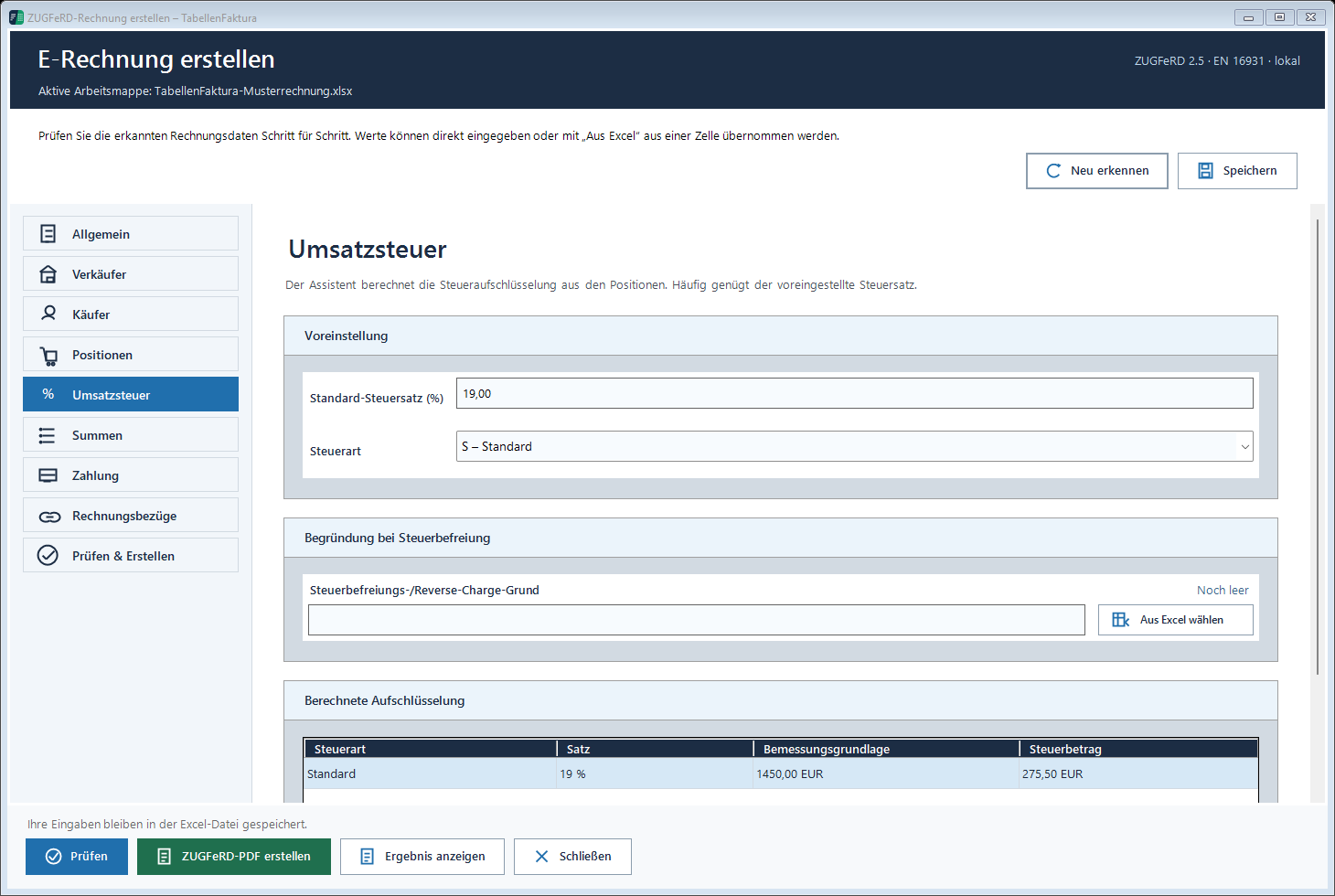
The figure shows the fields of the tax area, no tax clearance of a particular order. Documentation of VAT describes the operation. A set of zero with the wrong category remains a wrong classification, even if the final sum looks the same.
Eliminate contradictions before issue
Typical causes are an old tax category from the standard template, an empty explanatory text or a reference only visible in the PDF. Also problematic is a position column that still delivers 19 percent while the general tax area was set to reverse charge. Therefore check all tax sources used.
If an error message is not used to avoid another category, only to make the check green. Software information must reflect the clarified facts. For invoices with several tax treatments, the individual groups must be additionally checked; the simple example of this article contains only a reverse charge case.
Decrease the generated file and the invoice text together
After pre-examination, create ZUGFeRD or the output format required by the recipient. Then compare stakeholders, performance description, tax category, reason and amounts in the finished file. The technical audit confirms the audited rules of the file, not the actual conditions of the sales.
Keep the original file unchanged and send it via the agreed channel. Further instructions for setup include the documentation on special cases. For the entire export process leads Creating ZUGFeRD invoices with Excel by preparation and result control.
Described function state: TabellenFaktura 1.6.8. Illustrations contain example information; recordings of previous program states are marked.
Frequently asked questions
Is 0% VAT enough for a reverse-charge invoice?
No. Tax category, rate, justification and required information must fit together. Different cases with zero euro tax are not automatically the same.
Does TabellenFaktura decide if reverse charge is valid?
No. The tax classification must be established for the specific process. The program supports the collection and technical examination of the associated data.
What category is used in the example?
AE for reverse charge. The set is 0 and a corresponding explanatory text is recorded.
Why does TabellenFaktura report a missing buyer VAT ID?
The supported reverse-charging process requires this information. Clear the actual data required and do not use a invented identifier.
May the PDF continue to show a normal 19 percentage file?
PDF and structured invoice data must describe the same process. Correct contradictory tax texts or formulas in the Excel template before final output.